
Your Company Was Hacked. Here's Exactly What to Do in the First 24 Hours.
A step-by-step incident response guide for the first 24 hours: contain the breach, preserve evidence, communicate without panic, and recover. Includes the AI-native threat angle most playbooks miss.
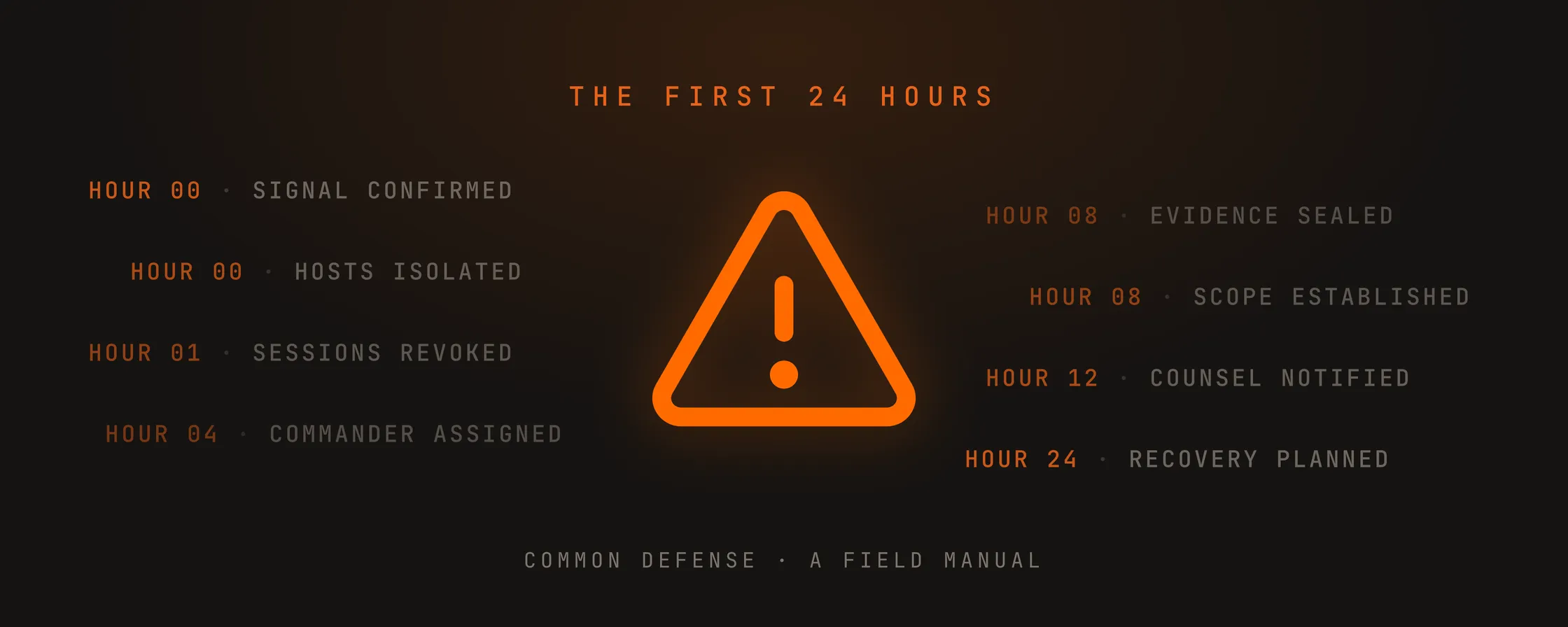
Quick Answer: What to Do If Your Company Was Hacked
If you are reading this in the middle of an incident, here is the immediate checklist:
- Isolate compromised systems at the network level. Do not power them off. A live system preserves forensic evidence that a dead one does not.
- Disable compromised accounts and revoke all active sessions and access tokens. Reset credentials only after preserving session data.
- Move incident communication to a clean channel. Assume the attacker is reading your email, Slack, and messaging apps.
- Preserve all logs, disk images, and memory dumps before rebuilding or wiping anything. Evidence you destroy in the first hour is evidence you cannot recover later.
- Notify your cyber insurance carrier and legal counsel. Most policies have notification windows. Missing them can void your coverage.
The rest of this article walks through each step in detail, hour by hour.
In this guide
- Why the First 24 Hours After a Breach Decide Everything
- Hour 0–1: Confirm the Breach and Contain the Threat
- Hour 1–4: Assemble Your Incident Response Team
- Hour 4–8: Preserve Evidence and Scope the Damage
- Hour 8–24: Communicate, Notify Regulators, and Plan Recovery
- Beyond 24 Hours: Post-Breach Recovery and Hardening Your Security
- Frequently Asked Questions
- When You Need Help Right Now
The Slack message comes in at 11:42 PM. “I think we got hacked.” A cold drop in the stomach. Someone is inside your company systems, and you have no idea how long they have been there.
This is what you do next. Not a theoretical framework. A field manual for the first 24 hours, written for the reality that attackers are now using AI to move faster than most human response teams can think.
Why the First 24 Hours After a Breach Decide Everything
The wrong decision in the first day can multiply the damage by an order of magnitude.
IBM’s 2025 Cost of a Data Breach Report found the U.S. average breach cost hit an all-time high of $10.22 million. The average breach lifecycle was 241 days: 181 days to detect, 60 days to contain. Breaches that ran past 200 days cost $1.14 million more than those contained faster, and organizations using AI-driven security extensively saved $1.9 million per breach while detecting incidents 80 days sooner. The FBI’s Internet Crime Complaint Center recorded $16.6 billion in cybercrime losses in 2024, a 33% increase year over year.
Most incident response guides were written for an era when attackers were human. That era is over. Modern attackers use AI to generate convincing deepfake voices, clone writing styles, and coordinate attacks across email, Slack, LinkedIn, and voice calls simultaneously. Vectra AI’s 2025 research found that 82.6% of phishing emails now incorporate AI-generated content. The FBI issued a public service announcement in May 2025 warning of an ongoing campaign using AI-generated voice messages to impersonate senior U.S. federal and state government officials.
Your incident response plan needs to account for this reality. Most do not.
Hour 0–1: Confirm the Breach and Contain the Threat
Step 1: Verify it is real (but do not wait to be sure)
Treat every credible signal as a breach until proven otherwise. You are looking for:
- Confirmed malware or ransomware execution
- Unexplained privileged account activity or new admin accounts
- Suspicious sign-ins: impossible travel, atypical locations, MFA fatigue
- Data access patterns that do not match business use: bulk exports, new mailbox rules, mass downloads
- Integrity changes: disabled logging, altered group policies, unexpected configuration changes
If you are on the fence, escalate. The cost of treating a real breach like “just an IT issue” is far higher than the cost of an early escalation.
Step 2: Isolate affected systems
Stop the attacker’s lateral movement without destroying evidence:
- Isolate compromised endpoints at the network level. Do not power them off. A live system preserves memory artifacts and process state that forensics teams need.
- Disable compromised accounts. Reset passwords only after preserving session data.
- Revoke all active sessions and refresh tokens for high-risk accounts. Enforce MFA re-registration.
- Review and remove suspicious OAuth applications, API keys, and mailbox forwarding rules.
Step 3: The “do not” list for the first day
Communicate these rules to everyone who might touch the response:
- Do not wipe or reimage systems. Rebuilding destroys evidence for root cause analysis, insurance claims, and legal defensibility.
- Do not run cleanup tools that alter timestamps or delete artifacts.
- Do not delete emails, logs, or cloud audit records.
- Do not communicate externally without an approved message path. The attacker may be monitoring your email and Slack.
- Do not pay a ransom or negotiate without leadership, counsel, and insurer involvement.
The NIST Computer Security Incident Handling Guide (SP 800-61 Rev. 3) is the authoritative framework. The containment-first, preserve-evidence discipline is the core principle.
Hour 1–4: Assemble Your Incident Response Team
You need clear ownership, not a 30-person war room. Assign these roles immediately:
- Incident Commander: One person owns decisions, priorities, and the timeline.
- Technical Lead: Runs containment, forensics, and remediation across endpoints, identity, and network.
- Scribe: Captures every action with timestamps. This log becomes the backbone of regulatory filings, insurance claims, and the post-mortem.
- Communications Owner: Coordinates internal updates and external messaging with legal. Every word matters.
- Vendor Liaison: Manages your MDR provider, forensics firm, cyber insurance carrier, and external counsel.
If you do not have an incident response partner on retainer, engage one now. Look for a firm that covers containment, forensics, and recovery across your full stack. Not just your endpoints. Prioritize firms with experience in multi-channel attacks: the best incident response teams today can correlate signals across email, messaging platforms, identity, endpoints, and cloud surfaces. A firm that only monitors your SIEM is not enough. Ask about their experience with AI-native threats specifically: deepfake social engineering, multi-channel phishing campaigns, and coordinated cross-platform attacks.
Switch to out-of-band communication
Assume the attacker is reading your email, Slack, and messaging apps. Move all incident communication to a clean channel: a Signal group, a fresh phone bridge, or a secure out-of-band platform. Do not use compromised infrastructure for anything related to the response.
The joint #StopRansomware Guide from CISA, MS-ISAC, NSA and the FBI explicitly warns that attackers may monitor your communications to understand whether their actions have been detected. Using compromised channels to coordinate your response tells the attacker exactly what you know.
Hour 4–8: Preserve Evidence and Scope the Damage
What to preserve
Forensic evidence is fragile. Prioritize:
- Full disk images of compromised endpoints (before rebooting)
- Memory dumps from live systems
- Firewall, VPN, and cloud audit logs
- Authentication logs, especially for privileged accounts
- Any attacker artifacts: files, scripts, notes, ransom demands
The scribe logs every action with timestamps. If you restore from backup, note exactly when and from which snapshot. If you reset a password, log the account, the time, and who authorized it.
What to answer by hour 8
- What was the initial access vector? Phishing? Credential stuffing? A deepfake voice call impersonating an executive?
- Which systems and data were accessed? Was anything exfiltrated?
- Does the incident involve PII, PHI, payment card data, or material non-public information?
- Is this a reportable breach under GDPR, SEC rules, or state data breach laws?
- Is the attacker still present?
The AI-native consideration
Traditional forensics looks for malware signatures and anomalous logins. AI-native attacks leave subtler footprints. Ask your team:
- Were there coordinated messages across multiple channels (email, LinkedIn, WhatsApp) designed to build false trust? Attackers now use AI to orchestrate conversations across platforms simultaneously, creating the illusion of a legitimate business interaction.
- Did anyone receive a voice or video call that seemed slightly off? A 2025 study found that participants correctly identified an AI-generated voice only 60% of the time, barely above chance. Voice cloning engines now require as little as 30 seconds of clean audio to produce a convincing synthetic voice.
- Were there phishing messages that matched a colleague’s writing style with unusual precision? AI models trained on a target’s publicly available writing can now replicate tone, vocabulary, and formatting with uncanny accuracy.
These are not hypotheticals. In January 2024, a finance worker at engineering firm Arup was tricked into authorizing fifteen wire transfers totaling $25.6 million after a video call in which every participant, including the “CFO”, was a deepfake. The attack worked because it was coordinated across email, messaging, and a live video call, and no single security tool flagged the pattern because no single tool saw all three surfaces.
Your forensics scope needs to expand beyond the endpoint. Pull logs from your email gateway, your messaging platforms, your VoIP system, and your social media admin panels. Look for correlation across surfaces. A single anomalous login might look like a user error. That same login paired with a suspicious LinkedIn message and a strange voice call is a breach.
Hour 8–24: Communicate, Notify Regulators, and Plan Recovery
Internal communication
Your team gets a factual summary of what is known and what is still unknown, clear instructions not to discuss the incident on Slack, email, or social media, a point of contact for questions, and the time of the next update. Avoid speculation. Avoid blame.
“We detected unauthorized access to a subset of our systems. Our incident response team is actively investigating and containing the situation. We will update you at [time].” That is enough.
External communication and regulatory notification
The order of operations:
- Cyber insurance carrier. Most policies have notification windows. Missing them voids coverage.
- Legal counsel. Privilege matters. Counsel guides the communication strategy and regulatory obligations.
- Regulatory bodies. Under SEC rules, material cybersecurity incidents must be disclosed on Form 8-K within four business days. GDPR requires notification within 72 hours. State laws vary.
- Affected customers and partners. Be honest and specific. The cover-up is always worse than the breach.
- Law enforcement. The FBI’s IC3 and CISA are resources. Engage them early.
Recovery planning
By hour 24, document the plan for restoring systems from clean backups, patching vulnerabilities, monitoring for reinfection, and a schedule for leadership updates and decision deadlines. Start a lessons-learned log now. Details fade quickly.
Beyond 24 Hours: Post-Breach Recovery and Hardening Your Security
The first day is survival. The weeks that follow are about rebuilding trust and hardening your posture.
First week: Complete the forensic investigation. Patch and harden. Notify affected parties. File regulatory disclosures.
First month: Conduct a full post-mortem. Update your incident response plan or build one if you did not have one. Run tabletop exercises against AI-native attack scenarios: deepfake executive impersonation, multi-channel social engineering, coordinated cross-platform attacks. Invest in continuous monitoring across all communication surfaces. Not just your endpoints and network. The median dwell time for a breach is still measured in days. The goal is to shrink detection time from weeks to hours.
First quarter: Implement the lessons from your post-mortem. Close the gaps the attacker exploited. Run another tabletop exercise against the updated plan. Build a relationship with an incident response firm before you need one. The worst time to evaluate vendors is during an active breach.
Frequently Asked Questions
What is the first thing you should do if your company is hacked?
Isolate compromised systems at the network level without powering them off. A live system preserves forensic evidence. Then disable compromised accounts, revoke active sessions, and move all incident communication to a clean, out-of-band channel.
Should I pay the ransom in a ransomware attack?
The FBI and CISA advise against paying. Payment does not guarantee data recovery, and it funds future attacks. The decision belongs to leadership, legal counsel, and your insurer. Do not negotiate or pay without all three involved.
How long does it take to recover from a cyber attack?
IBM’s 2025 report found the average breach lifecycle is 241 days: 181 days to detect, 60 days to contain. Breaches that ran past 200 days cost roughly $1.14 million more than those contained faster. Recovery speed depends on the attack type, backup quality, and whether you have a tested incident response plan.
Do I need to report a data breach to the government?
It depends on your jurisdiction, industry, and the data involved. Public companies must disclose material incidents to the SEC within four business days. GDPR requires notification within 72 hours. State laws vary. Engage legal counsel to determine your obligations.
What should I not do after discovering a data breach?
Do not wipe or reimage systems. Do not run cleanup tools. Do not delete logs, emails, or audit records. Do not communicate externally on compromised channels. Do not pay a ransom or negotiate without leadership, counsel, and insurer involvement.
How can I prepare my company before an attack happens?
Build an incident response plan and test it with tabletop exercises. Invest in proactive monitoring across all communication surfaces. Train employees to recognize AI-enhanced social engineering. Maintain clean, offline backups. Establish a relationship with an incident response provider before you need one: vet them, contract them, and run a tabletop exercise with them so they are not strangers when the call comes.
When You Need Help Right Now
This guide was written by Common Defense, an AI-native cybersecurity firm and incident response provider. All guidance above is based on public frameworks from NIST, CISA, and the FBI and is vendor-neutral.
Common Defense defends organizations against AI-native social engineering across email, messaging, social platforms, and voice and video calls. When an attacker is already inside, the team contains, investigates, and eradicates the threat while preserving the evidence insurers, lawyers, and regulators will ask for.
Reach out immediately if you’re in an active incident. Install the communication firewall to prevent one.
Contact Quantstamp for a blockchain audit or if you’re experiencing a web3 hack.
About Common Defense
Common Defense is an AI cyber lab built by security veterans and AI researchers, whose team has helped protect more than $300B in assets across 1,100+ security engagements. We help AI companies, fintechs, and crypto protocols secure the communication channels and operations that attackers target most.